Requesting proposer commitment signatures with Commit-Boost
When you create a new validator on the Ethereum network, one of the steps is the generation of a new BLS private key (commonly known as the "validator key" or the "signer key") and its corresponding BLS public key (the "validator pubkey", used as an identifier). Typically this private key will be used by an Ethereum consensus client to sign things such as attestations and blocks for publication on the Beacon chain. These signatures prove that you, as the owner of that private key, approve of the data being signed. However, as general-purpose private keys, they can also be used to sign other arbitrary messages not destined for the Beacon chain.
Commit-Boost takes advantage of this by offering a standard known as proposer commitments. These are arbitrary messages (albeit with some important rules), similar to the kind used on the Beacon chain, that have been signed by one of the owner's private keys. Modules that use Commit-Boost's proposer commitments can construct their own data in whatever format they like and request that Commit-Boost's Signer service generate a signature for it with a particular private key. The module can then use that signature to verify the data was signed by that user.
Commit-Boost supports proposer commitment signatures for both BLS private keys (identified by their public key) and ECDSA private keys (identified by their Ethereum address).
Rules of proposer commitment signatures
Proposer commitment signatures produced by Commit-Boost's Signer service conform to the following rules:
- Signatures are unique to a given EVM chain (identified by its chain ID). Signatures generated for one chain will not work on a different chain.
- Signatures are unique to Commit-Boost proposer commitments. The Signer service cannot be used to create signatures that could be used for other applications, such as for attestations on the Beacon chain. While the Signer service has access to the same validator private keys used to attest on the Beacon chain, it cannot create signatures that would get you slashed on the Beacon chain.
- Signatures are unique to a particular module; identical payloads from two modules produce two different signatures (see The signing ID).
- The data payload being signed must be a 32-byte array, typically serialized as a 64-character hex string with an optional
0xprefix. The value itself is arbitrary, as long as it has meaning to the requester, though it is typically the 256-bit hash of some kind of data. - If requesting a signature from a BLS key, the resulting signature will be a standard BLS signature (96 bytes in length).
- If requesting a signature from an ECDSA key, the resulting signature will be a standard Ethereum RSV signature (65 bytes in length).
- The
noncefield can make signatures unique per request (see Nonces).
Configuring a module for proposer commitments
Commit-Boost's Signer service must be configured prior to launching to expect requests from your module. There are two main parts:
-
An entry for your module into Commit-Boost's configuration file. This must include a unique ID for your module, the line
type = "commit", and include a unique signing ID for your module. Generally you should provide values for these in your documentation, so your users can reference it when configuring their own Commit-Boost node. -
A JWT secret used by your module to authenticate with the signer in HTTP requests. This must be a string that both the Commit-Boost signer can read and your module can read, but no other modules should be allowed to access it. The user should be responsible for determining an appropriate secret and providing it to the Commit-Boost Signer service securely; your module will need some way to accept this, typically via a command line argument that accepts a path to a file with the secret or as an environment variable.
Once the user has configured both Commit-Boost and your module with these settings, your module will be able to authenticate with the Signer service and request signatures.
The signing ID
Your module's signing ID is a 32-byte value that is used as a unique identifier within the signing process. Proposer commitment signatures incorporate this value along with the data being signed as a way to create signatures that are exclusive to your module, so other modules can't maliciously construct signatures that appear to be from your module. Your module must have this ID incorporated into itself ahead of time, and the user must include this same ID within their Commit-Boost configuration file section for your module. Commit-Boost does not maintain a global registry of signing IDs, so this is a value you should provide to your users in your documentation.
The Signing ID is decoupled from your module's human-readable name (the id field of the [[modules]] entry in the Commit-Boost configuration file) so that any changes to your module name will not invalidate signatures from previous versions. Similarly, if you don't change the module ID but want to invalidate previous signatures, you can modify the signing ID and it will do so. Just ensure your users are made aware of the change, so they can update it in their Commit-Boost configuration files accordingly.
Nonces
Your module has the option of using Nonces for each of its signature requests. Nonces are intended to be unique values that establish a sequence of signature requests, distinguishing one signature from another, even if all of their other payload information is identical. When making a request for a signature, you may include a unique nonce as part of the request; the signature will include it in its data, ensuring that things like replay attacks cannot be used for that signature.
If you want to use them within your module, your module (or whatever remote backend system it connects to) will be responsible for storing, comparing, validating, and otherwise using the nonces. Commit-Boost's Signer service by itself does not store nonces or track which ones have already been used by a given module.
In terms of implementation, the nonce is an unsigned 64-bit integer. Per the convention in EIP-2681 the maximum value is 2^64-2, though the Signer service does not enforce this cap. The field is required and is always mixed into the signing root. Modules that do not use nonces for replay protection should always send 0; modules that do should use a monotonically increasing value per key.
Structure of a signature
The form proposer commitment signatures take depends on the type of signature being requested. BLS signatures take the standard form (96-byte values). ECDSA (Ethereum EL) signatures take the standard Ethereum ECDSA r,s,v signature form. In both cases, the data being signed is a 32-byte hash: the root hash of a composite two-stage SSZ Merkle tree, described below:
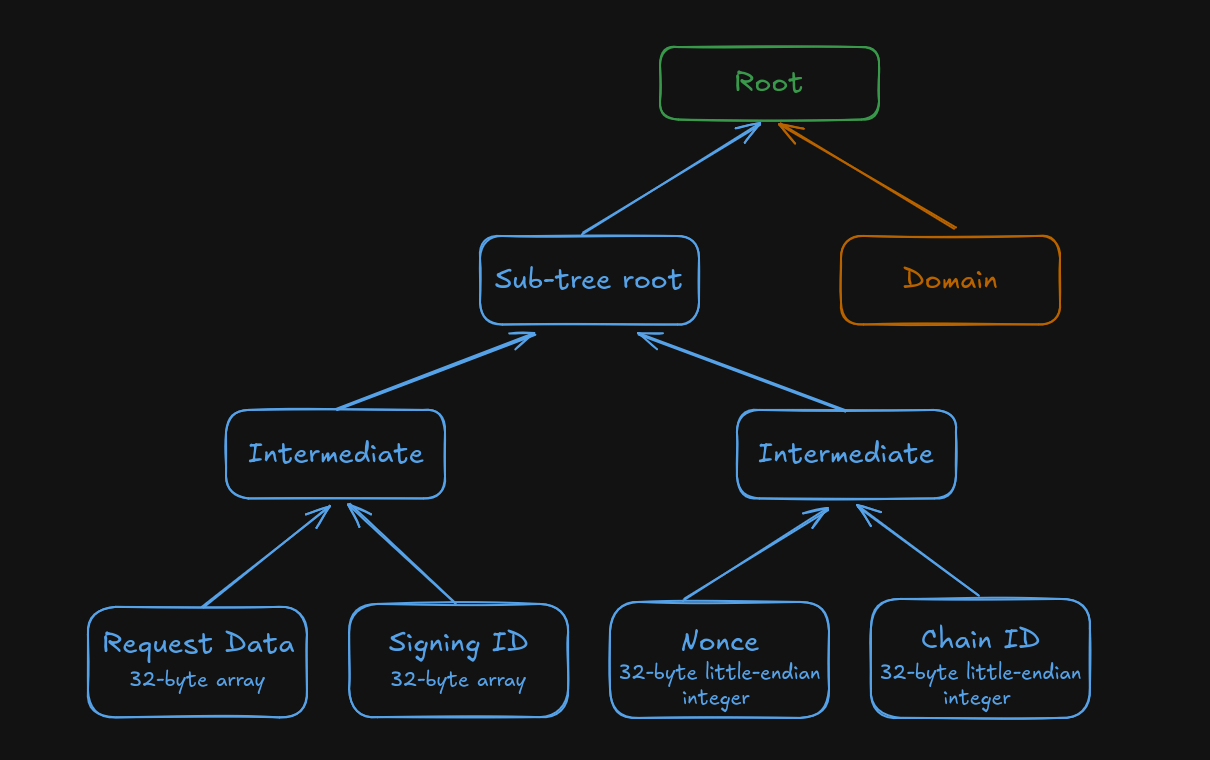
where, for the sub-tree in blue:
-
Request Datais a 32-byte array that serves as the data you want to sign. This is typically a hash of some more complex data on its own that your module constructs. -
Signing IDis your module's 32-byte signing ID. The Signer service will load this for your module from its configuration file. -
Nonceis the request's nonce (see Nonces). Conforming with the tree specification, it must be added as a 256-bit unsigned little-endian integer. Most libraries will be able to do this conversion automatically if you specify the field as the language's primitive for 64-bit unsigned integers (e.g.,uint64,u64,ulong, etc.). -
Chain IDis the ID of the chain that the Signer service is currently configured to use, as indicated by the Commit-Boost configuration file. This must also be a 256-bit unsigned little-endian integer.
A Merkle tree must be constructed from these four leaf nodes, and its root hash calculated according to the standard SSZ hash computation rules. This result will be called the "sub-tree root". With this, a second Merkle tree is created using this sub-tree root and a value called the Domain:
Domainis the 32-byte output of the compute_domain() function in the Beacon specification. The 4-byte domain type in this case is not a standard Beacon domain type, but rather Commit-Boost's own domain type:0x6D6D6F43.
The data signed in a proposer commitment is the 32-byte hash root of this new tree (the green Root box).
Many languages provide libraries for computing the root of an SSZ Merkle tree, such as fastssz for Go or tree_hash for Rust. When verifying proposer commitment signatures, use a library that supports Merkle tree root hashing, the compute_domain() operation, and validation for signatures generated by your key of choice.
Authentication
Every request to the Signer service (except the health-check endpoint) must present a Bearer token in the Authorization header.
Module JWT
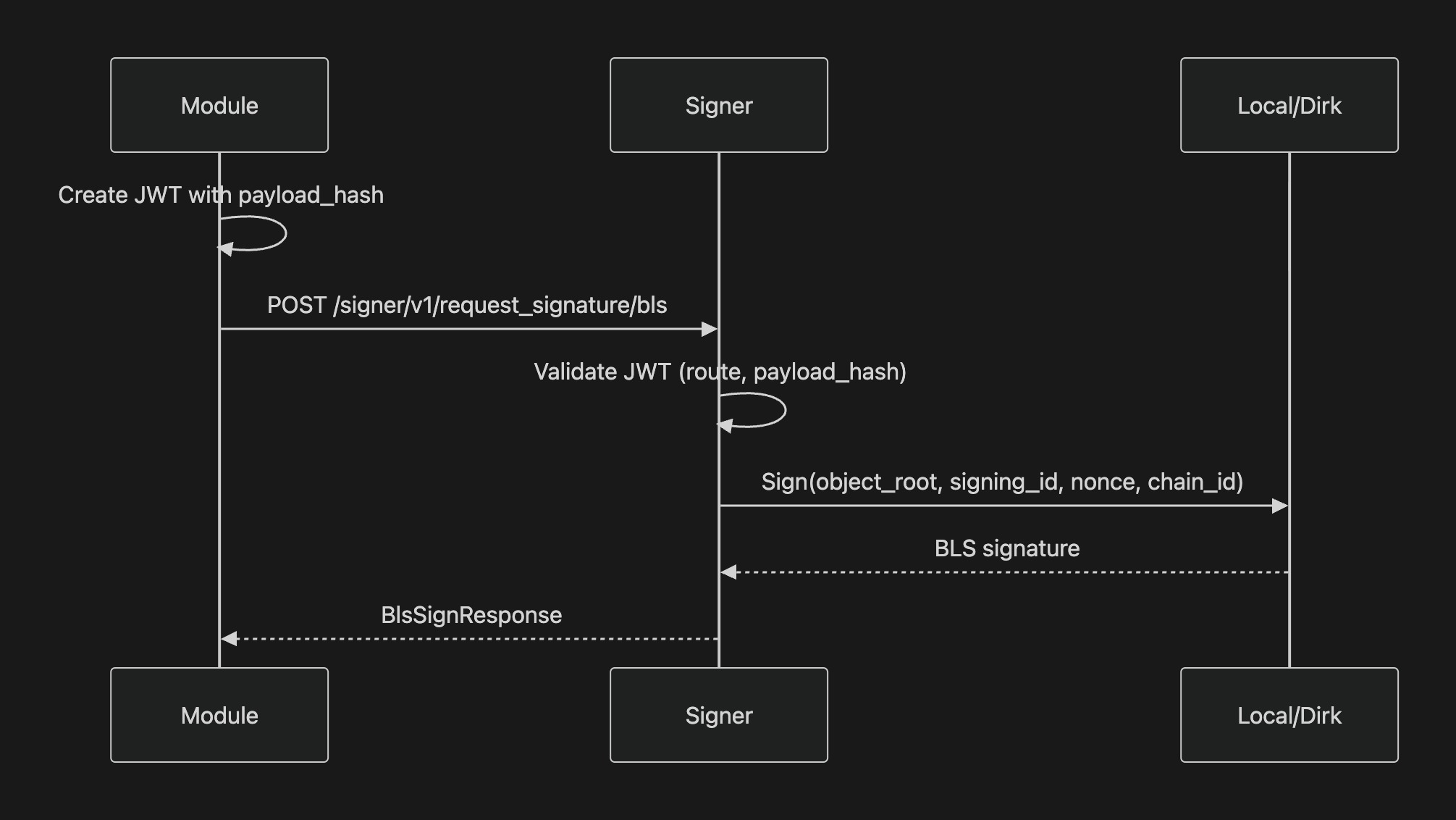
Modules authenticate with a signed JWT using the pre-shared secret (CB_SIGNER_JWT env var). The JWT is an HS256 token with the following claims:
| Claim | Type | Required | Description |
|---|---|---|---|
module | string | always | The module's id from the [[modules]] entry in cb-config.toml. |
route | string | always | The exact request path, e.g. /signer/v1/get_pubkeys. |
exp | integer | always | UNIX timestamp for when the token expires. |
payload_hash | string | POST only | Keccak-256 hash of the JSON-encoded request body, with 0x prefix. Skipped for GET requests. |
The payload_hash claim prevents JWT replay attacks: a token issued for one POST request body cannot be reused with a different body on the same route.
Token lifecycle: Expiry is 5 minutes (SIGNER_JWT_EXPIRATION crate constant). Refresh is client-side: there is no refresh endpoint. The module generates a new JWT locally using the pre-shared secret. The SDK's SignerClient creates a fresh token on every request automatically.
Admin token
Administrative endpoints (/reload, /revoke_jwt) authenticate with a separate JWT signed with the CB_SIGNER_ADMIN_JWT secret (env var), using the same HS256 algorithm. Its claims are the module claims minus module, plus an admin flag:
| Claim | Type | Required | Description |
|---|---|---|---|
admin | boolean | always | Must be true. |
route | string | always | The exact request path, /reload or /revoke_jwt. |
exp | integer | always | UNIX timestamp for when the token expires. |
payload_hash | string | always in practice | Keccak-256 hash of the JSON-encoded request body, with 0x prefix. Both admin endpoints require a JSON body, so every admin request needs this claim. |
Rate limiting
The Signer service rate-limits failed authentications by client IP (default 3 per 5 minutes); limits and reverse-proxy IP extraction are configured in [signer], see Configuration > Rate limit.
API quickstart
Below is a walkthrough of the full Signer API flow using the Rust SDK. The SignerClient (returned by load_commit_module_config) handles token management for you (see Module JWT). Besides commit-boost, your Cargo.toml needs serde with the derive feature for the config struct, tokio with the macros and rt-multi-thread features for the async runtime, and eyre for the error type.
use commit_boost::prelude::*;
use serde::Deserialize;

// 1. Load the module config; this gives you a pre-configured SignerClient
#[derive(Debug, Deserialize)]
struct ExtraConfig { /* your module's custom fields */ }

#[tokio::main]
async fn main() -> eyre::Result<()> {
    let config = load_commit_module_config::<ExtraConfig>()?;
    let mut client = config.signer_client;

    // 2. List available validator pubkeys
    let pubkeys = client.get_pubkeys().await?;
    println!("Loaded {} validators", pubkeys.keys.len());

    // 3. Generate a BLS proxy key for a consensus pubkey
    let consensus = pubkeys.keys[0].consensus.clone();
    let delegation = client.generate_proxy_key_bls(consensus.clone()).await?;
    let proxy_pubkey = delegation.message.proxy;

    // 4. Request a signature with the consensus key
    #[derive(TreeHash)]
    struct Datagram { data: u64 }

    let datagram = Datagram { data: 42 };
    let request = SignConsensusRequest::builder(consensus).with_msg(&datagram);
    let sig = client.request_consensus_signature(request).await?;

    // 5. Or request a signature with the proxy key
    let proxy_request = SignProxyRequest::builder(proxy_pubkey).with_msg(&datagram);
    let proxy_sig = client.request_proxy_signature_bls(proxy_request).await?;

    Ok(())
}
For a complete working example, see examples/da_commit/ in the repository.
Common workflows
Requesting a BLS consensus signature
Generating and using a proxy key
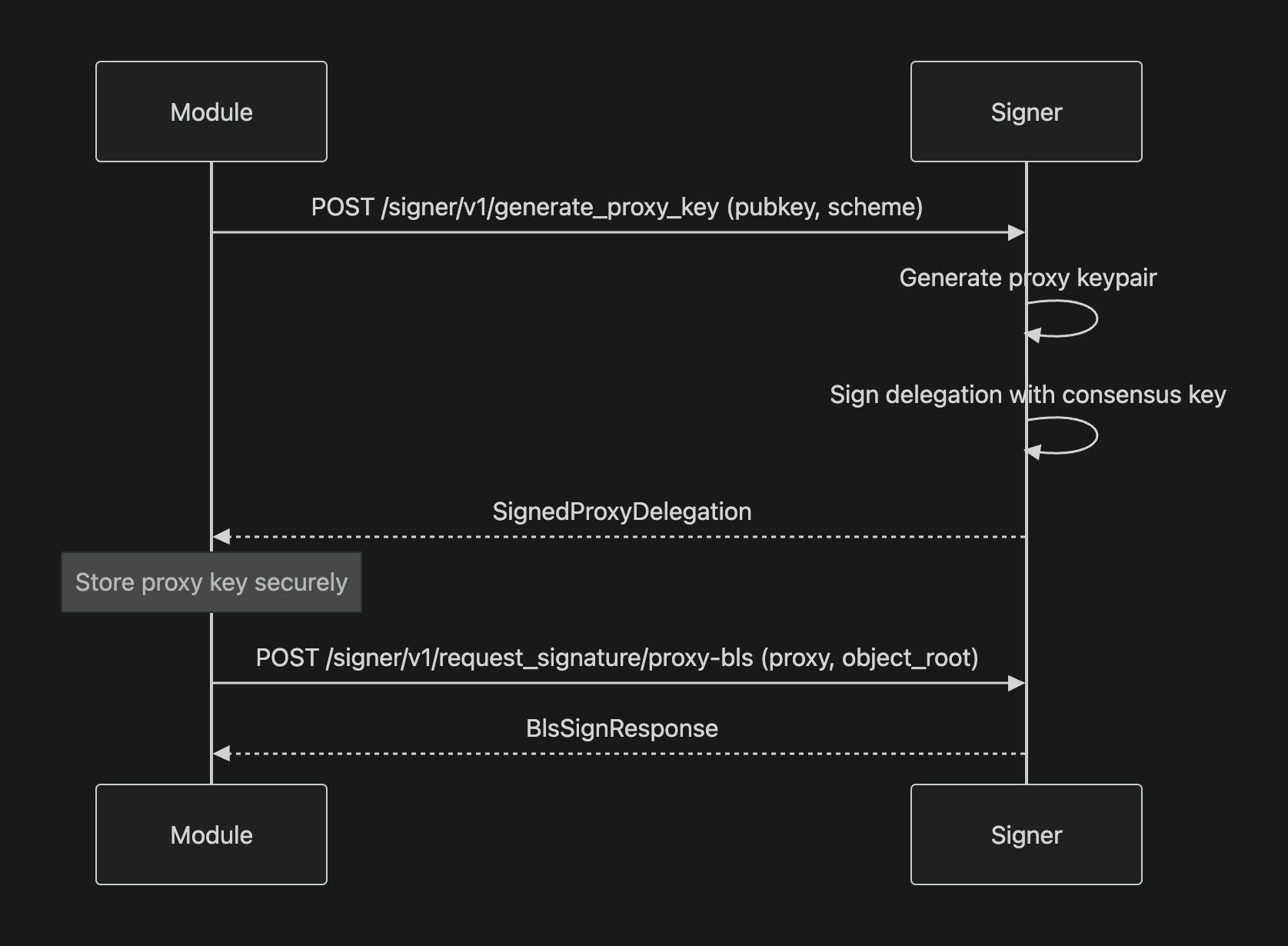
The proxy private key never leaves the signer, despite the diagram's "store proxy key securely" note. The module receives only the SignedProxyDelegation (the delegator and proxy identifiers plus the delegation signature) and stores that, not the key.
ECDSA proxy signing is not available when the signer is using the Dirk backend. Dirk only supports BLS operations.
Error codes
All error responses return a plain-text body with a human-readable description of the error.
| HTTP Status | Meaning |
|---|---|
400 | Missing or malformed Authorization header, unreadable or oversized request body, missing signing ID, or operation not supported by the current backend (e.g. ECDSA proxy with Dirk). |
401 | Invalid JWT: expired, signed with the wrong secret, or claims that do not match the request. A missing or malformed Authorization header returns 400 instead. |
404 | Requested consensus signer, proxy signer, or module ID does not exist. |
422 | Request body failed deserialization, e.g. a pubkey that is not valid hex of the expected length. |
429 | Too many failed authentication attempts. Retry after the timeout period. |
500 | Internal server error. The request was valid but could not be fulfilled. |
502 | Signer is running in Dirk mode but Dirk is unreachable. |